Examples
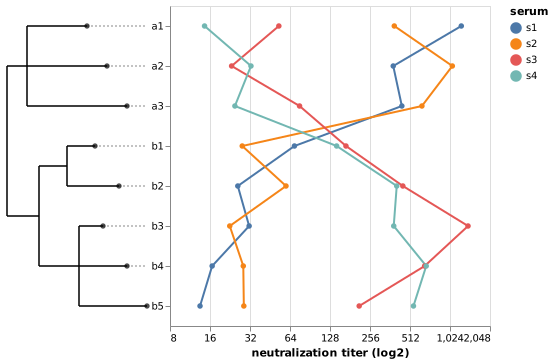
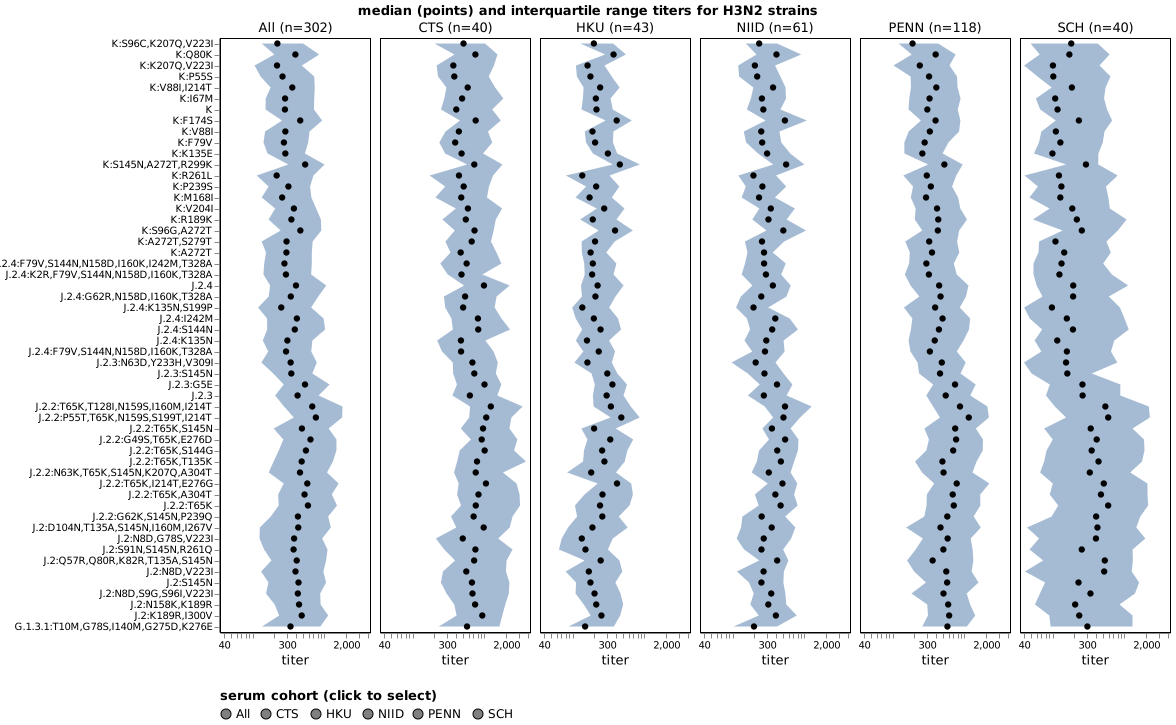
Three runnable examples that span the package's API surface. Each is shown with a static screenshot of the rendered output and a link to the fully interactive Altair-rendered version, with tooltips, selection bindings, and (for the Kikawa charts) the cohort-toggle legend.
1. Synthetic 8-tip tree — minimum end-to-end
The smallest possible call to
tree_annotated_plot.plot:
8 tips in two clades, four titer values per tip, a flat alt.Chart
with strain:N on the y-axis. Useful when you're sanity-checking an
installation or understanding the API at minimum complexity.
The source for this example lives in
examples/synthetic_example.py.
Running it produces examples/data/synthetic_tree.json (the Auspice
tree) and examples/data/synthetic_chart.json (the saved Vega-Lite
chart spec); the CLI invocation below consumes those two files.
Open the interactive chart in a new tab →
Reproduce — command line
python examples/synthetic_example.py
tree-annotated-plot \
    --tree examples/data/synthetic_tree.json \
    --chart examples/data/synthetic_chart.json \
    --output examples/data/synthetic_example.html \
    --chart-strain-field strain \
    --tree-strain-field name \
    --branch-length div \
    --tree-size 140
Reproduce — Python API
This can also be done via the Python API using:
import tree_annotated_plot

# `synthetic_auspice()` returns an Auspice JSON dict; build_chart()
# returns an alt.Chart with strain on y. Both live in
# examples/synthetic_example.py.
out = tree_annotated_plot.plot(
    synthetic_auspice(),
    build_chart(synthetic_titers()),
    chart_strain_field="strain",
    tree_strain_field="name",
    branch_length="div",
    tree_size=140,
)
2. Kikawa H3N2 — vertical layout, real Auspice tree
The realistic case: HA neutralization titers for ~50 H3N2 strains
across multiple sera cohorts, paired with the matching Nextstrain
Auspice tree from
jbloomlab/flu-seqneut-2025to2026.
You can view the tree on Nextstrain
or download the
raw Auspice JSON
that this example feeds into tree-annotated-plot.
The chart is a VConcatChart wrapping a FacetChart wrapping a
LayerChart (errorband + median-points), with a strain encoding on
each layer — tree_annotated_plot.plot walks all of it and rewrites
every encoding's sort to the tree's tip order in a single deepcopy.
This example also demonstrates the case the package was designed
for: the chart's strain values and the tree's tip identifiers come
from different fields but join by value. The chart encodes
axis_label:N (a haplotype label like K:S96C,K207Q,V223I); the
tree carries the same label at node_attrs.derived_haplotype.value.
You name them with chart_strain_field and tree_strain_field
independently.
The titer chart on its own (no tree):
Open the interactive chart in a new tab →
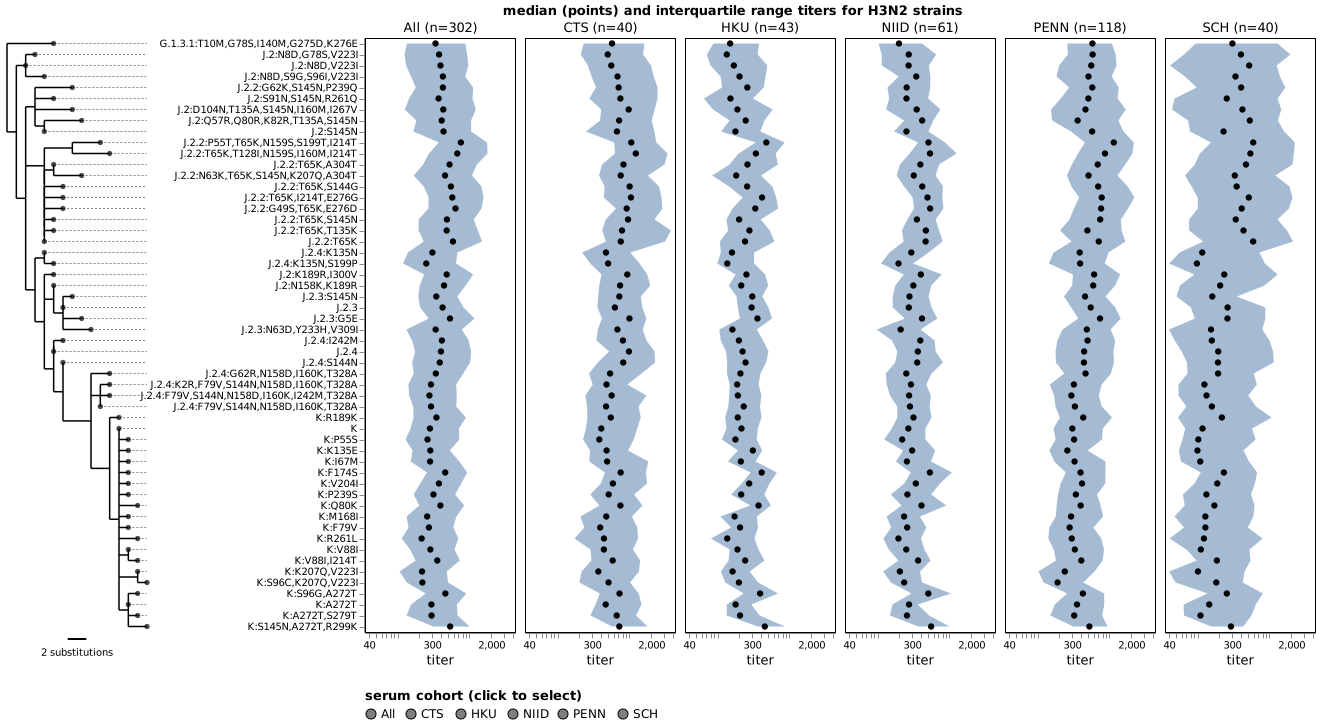
With the tree panel added by tree-annotated-plot:
Open the interactive chart in a new tab →
The strain axis is on y, so tree_annotated_plot.plot auto-picks
the vertical layout (tree_location defaults to "left" on a
y-encoded strain): result is an HConcatChart with the tree on the
left and a centered scale bar at the bottom of the tree panel. The
chart's natural strain-axis labels are kept exactly as the
chart-builder wrote them (fonts, ticks, axis title, and all), and the
tree's dashed leader lines stop at the tree panel's chart-facing
edge.
The H3N2 example above is rendered with color_tree_by="subclade",
which colors the tree's branches and tip circles by the
node_attrs.subclade value at each node. The package's default places
the categorical legend at the bottom of the combined plot; here we pass
tree_color_legend_format={"orient": "left"} to push it to the left
side instead, so it doesn't compete with the cohort-selection legend
already sitting below the chart. See "Color the tree" below for the
full set of options.
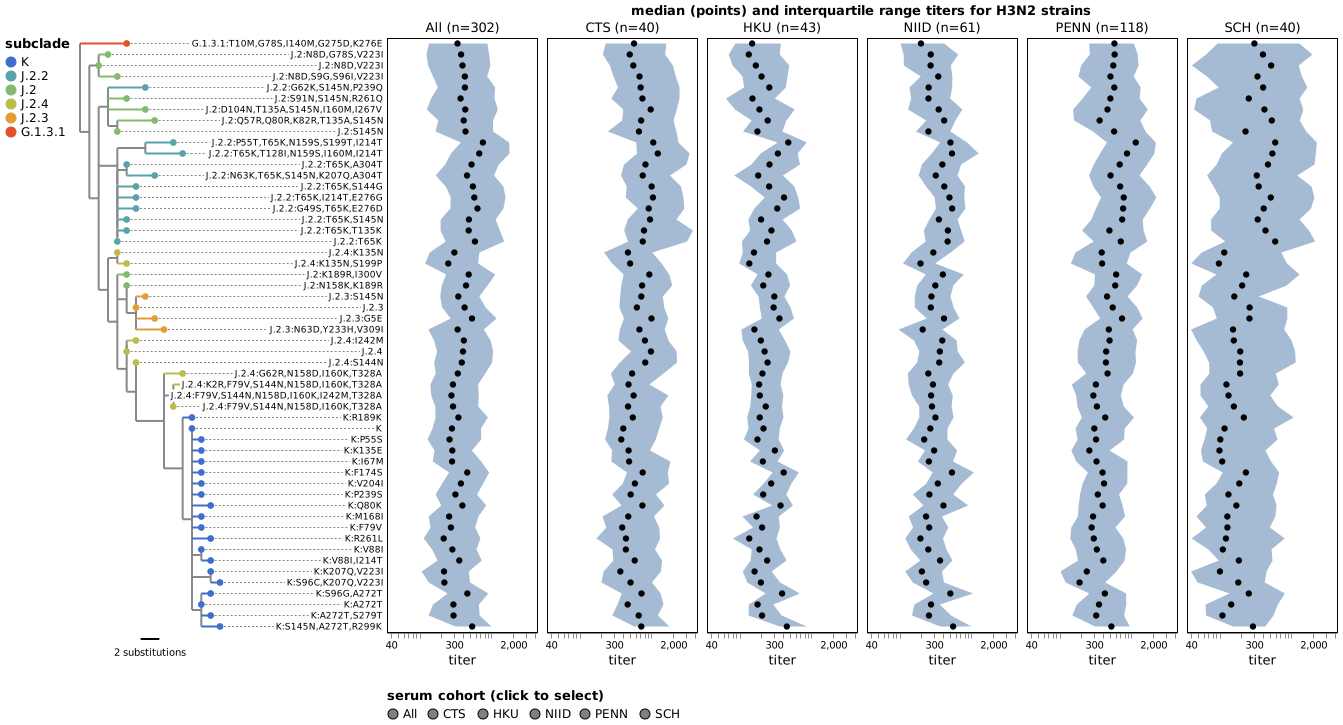
Optional: connect leaders all the way to the labels
If you'd prefer the dashed leaders to run flush into the strain
labels themselves (with no break between tip and label), set
connect_leader_to_label=True. This involves moving the labels off
the chart's natural axis and into the tree panel, with a few
trade-offs to be aware of:
- The chart's strain-axis is replaced: any labels, ticks, title,
or custom
axis=...you set on that encoding are dropped, and replacement labels are rendered alongside the tree. - Label widths are estimated, not measured exactly, so layout may
need tuning. The two main knobs are
strain_label_font_size(default 10) andshift_tree_loc(a manual pixel offset that moves the tree closer to the labels).
The example below turns on label connection, shrinks the labels to
9 pt, and uses shift_tree_loc=60 to bring the tree flush against
them:
Open the interactive chart in a new tab →
CLI flags: --connect-leader-to-label --strain-label-font-size 9
--shift-tree-loc 60. In Python:
connect_leader_to_label=True, strain_label_font_size=9, shift_tree_loc=60.
Color the tree
Pass color_tree_by to color the tree's branches and tip circles by
any property the Auspice JSON exposes — broadly, anything that
appears in the "Color By" dropdown on the Nextstrain view of the same
tree. Two forms are supported:
- A named attribute, e.g.
color_tree_by="subclade"(used in the example above). Common alternatives include"clade_membership","region","country"— whichever the tree provides. - A genotype at one or more sites in a gene. For a single site,
color_tree_by="genotype:HA1:158"colors each tip by the amino acid at HA1 site 158. A comma-separated list gives a haplotype:"genotype:HA1:158,189". Sites that don't vary in the tree are dropped from the haplotype label.
Colors match what you'd see on the Nextstrain view of the same tree —
either from the JSON's palette information when the build provides it,
or from the same default palette Auspice uses when it doesn't.
Categories are ordered by descending frequency in both cases. Missing
values render in gray. By default the legend is drawn at the bottom of
the combined plot; the H3N2 examples in this section pass
tree_color_legend_format={"orient": "left"} to move it to the left
instead, since the bottom edge already carries the cohort-selection
legend.
The example below colors the same H3N2 chart by genotype at HA1
site 158, which has two mutations in the tree (N158K, N158D) and
so renders three states (N, K, D):
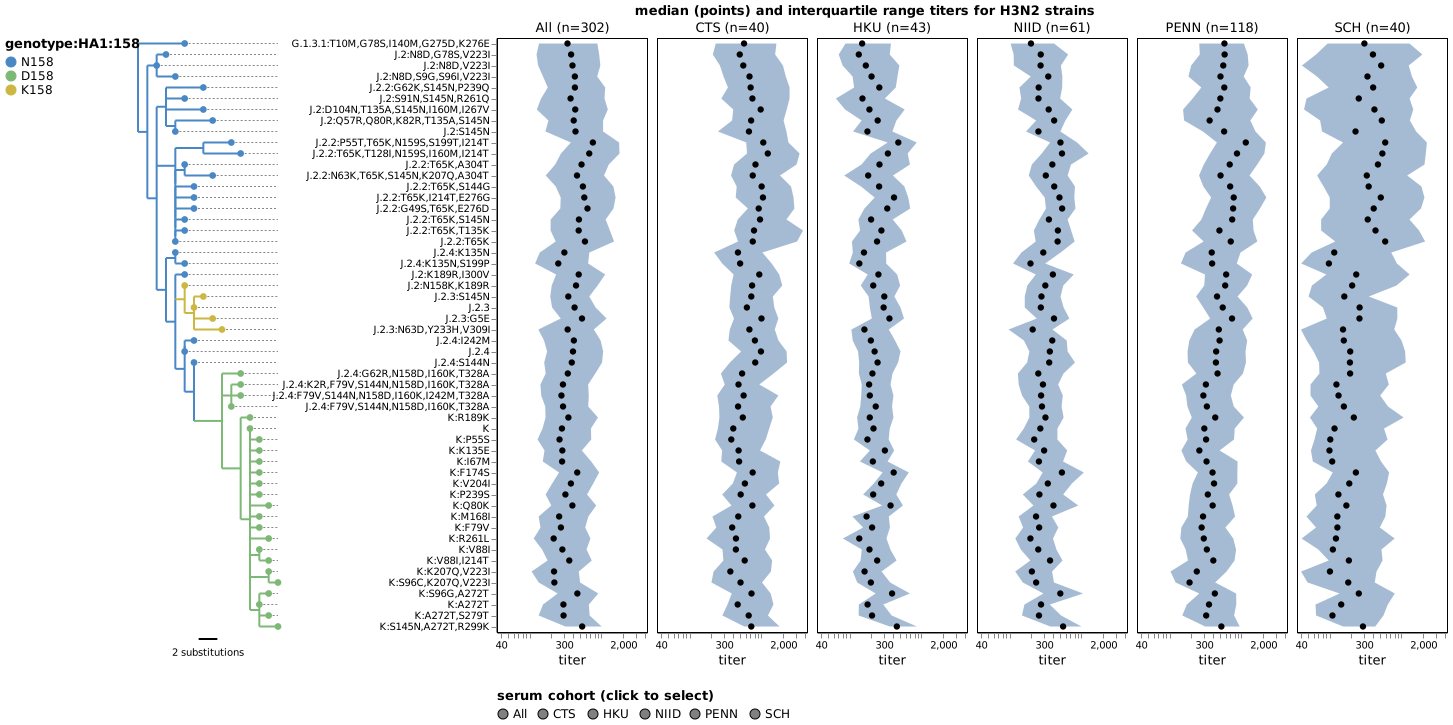
Open the interactive chart in a new tab →
CLI flag: --color-tree-by genotype:HA1:158. In Python:
color_tree_by="genotype:HA1:158".
Customizing the colors and legend
Four optional knobs let you override the defaults:
tree_color_scale— supply your own{category: color}mapping instead of the Auspice palette. Keys must match the tree's categories one-to-one (extras or misses are an error). The legend order follows the order of keys you pass."unknown"is always gray and must not be specified.tree_color_legend_format— pass any subset of Vega-Lite's Legend properties as a dict to style the legend (orient,direction,columns,padding,offset,labelFontSize,titleFontSize, …). Smart default: whenorientis"left"or"right"and you have not setcolumnsordirection, entries stack vertically (columns=1is forced).tree_color_legend_show— set toFalseto hide the legend entirely while keeping the tree colored.scale_bar_font_size— font size for the scale bar's label.
The exact category strings depend on the form of color_tree_by:
color_tree_by |
Example category strings |
|---|---|
node attribute (e.g. "subclade") |
"K", "J.2", "J.2.4" |
"genotype:HA1:158" (single site) |
"K158", "R158", "E158" |
"genotype:HA1:158,189" (both sites vary) |
"K158/E189", "R158/E189" |
"genotype:HA1:158,189" (189 invariant) |
"K158", "R158" (invariant site dropped) |
If you pass keys that don't match, the error message lists the tree's actual categories so you can copy them.
The H3N2 example below puts all four knobs to work: an explicit 6-color palette (a colorblind-safe Okabe–Ito-inspired set) ordered K → J.2.4 → J.2.3 → J.2.2 → J.2 → G.1.3.1, the legend moved to the left of the combined plot at 14-pt, and a matching 14-pt scale-bar label.
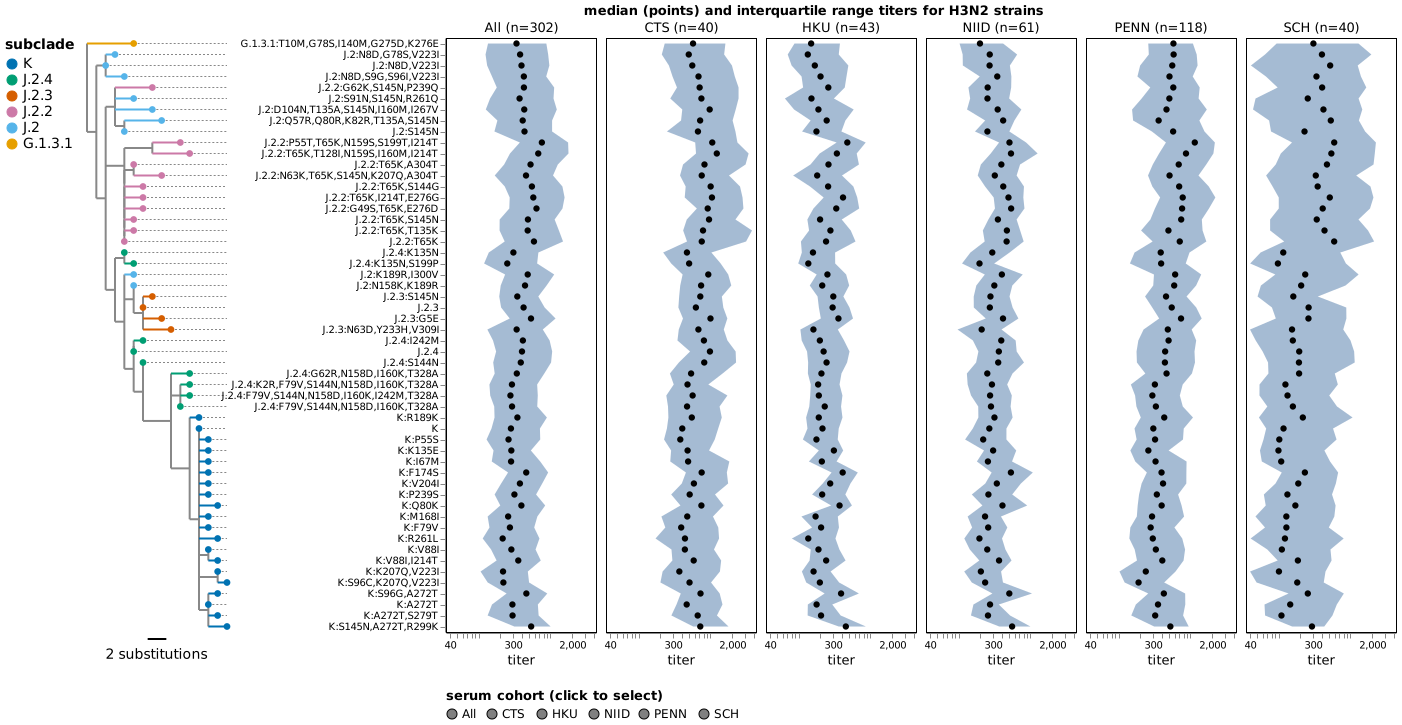
Open the interactive chart in a new tab →
out = tree_annotated_plot.plot(
    "examples/data/flu-seqneut-2025to2026_H3N2.json",
    chart,
    chart_strain_field="axis_label",
    tree_strain_field="derived_haplotype",
    branch_length="div",
    tree_size=140,
    scale_bar=True,
    branch_length_units="substitutions",
    color_tree_by="subclade",
    tree_color_scale={
        "K": "#0072B2",
        "J.2.4": "#009E73",
        "J.2.3": "#D55E00",
        "J.2.2": "#CC79A7",
        "J.2": "#56B4E9",
        "G.1.3.1": "#E69F00",
    },
    tree_color_legend_format={
        "orient": "left",
        "labelFontSize": 14,
        "titleFontSize": 14,
    },
    scale_bar_font_size=14,
)
--tree-color-scale on the CLI is a comma-separated list of
key=color pairs and --tree-color-legend-format is a JSON object
string (quote the whole argument in both cases so the shell doesn't
interpret #, braces, or quotes):
tree-annotated-plot \
    --tree examples/data/flu-seqneut-2025to2026_H3N2.json \
    --chart examples/data/flu-seqneut-2025to2026_H3N2_titers.json \
    --chart-strain-field axis_label \
    --tree-strain-field derived_haplotype \
    --branch-length div \
    --tree-size 140 \
    --scale-bar \
    --branch-length-units substitutions \
    --color-tree-by subclade \
    --tree-color-scale "K=#0072B2,J.2.4=#009E73,J.2.3=#D55E00,J.2.2=#CC79A7,J.2=#56B4E9,G.1.3.1=#E69F00" \
    --tree-color-legend-format '{"orient":"left","labelFontSize":14,"titleFontSize":14}' \
    --scale-bar-font-size 14 \
    --output examples/data/h3n2_combined_custom_colors.html
Reproduce — command line
python examples/fetch_auspice_data.py
python examples/flu-seqneut-2025to2026_titer_charts.py
tree-annotated-plot \
    --tree examples/data/flu-seqneut-2025to2026_H3N2.json \
    --chart examples/data/flu-seqneut-2025to2026_H3N2_titers.json \
    --chart-strain-field axis_label \
    --tree-strain-field derived_haplotype \
    --branch-length div \
    --tree-size 140 \
    --scale-bar \
    --branch-length-units substitutions \
    --color-tree-by subclade \
    --tree-color-legend-format '{"orient":"left"}' \
    --output examples/data/h3n2_combined.json
Reproduce — Python API
This can also be done via the Python API using:
out = tree_annotated_plot.plot(
    "examples/data/flu-seqneut-2025to2026_H3N2.json",
    chart,                          # built by examples/flu-seqneut-2025to2026_titer_charts.py
    chart_strain_field="axis_label",
    tree_strain_field="derived_haplotype",
    branch_length="div",
    tree_size=140,
    scale_bar=True,
    branch_length_units="substitutions",
    color_tree_by="subclade",
    tree_color_legend_format={"orient": "left"},
)
3. Kikawa H1N1 — horizontal layout, tree below the chart
Same data shape, same VConcat(Facet(Layer)) chart structure, but
the chart-builder encodes axis_label on x instead of y. The
strain labels then render at the bottom of the chart panel, so
tree_annotated_plot.plot's default tree_location="bottom" puts
the tree underneath the chart with its tips at the top — flush
against the strain labels above. The output is a VConcatChart.
Branches in the tree grow upward (root at the bottom of the tree
panel, tips at the top) and the scale bar's text rotates 270° to
read parallel to the now-vertical bar.
You can view the H1N1 tree on Nextstrain or download the raw Auspice JSON fed into the example.
This example demonstrates layout auto-detection: nothing about the
call differs from the H3N2 case beyond the chart itself. The package
detects which axis carries chart_strain_field and dispatches.
The titer chart on its own (no tree):
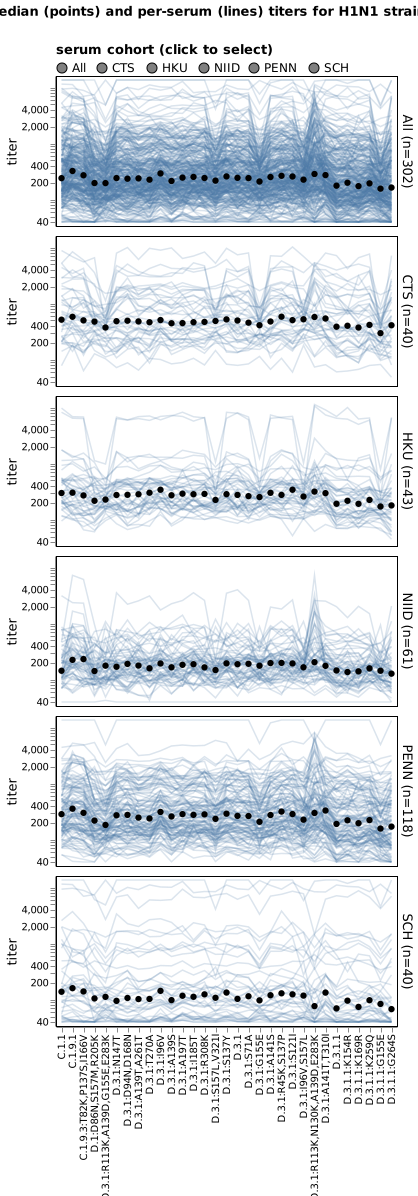
Open the interactive chart in a new tab →
With the tree panel added by tree-annotated-plot:
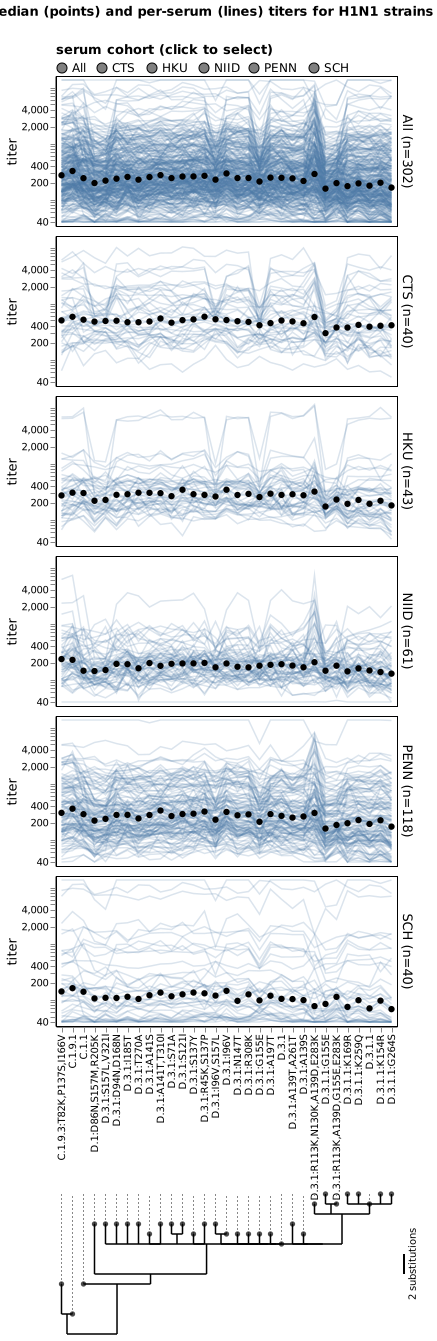
Open the interactive chart in a new tab →
The chart-builder script puts the cohort legend above the H1N1 faceted chart specifically so that the strain labels land on the chart panel's bottom edge — which is where the tree's tips sit when vconcat'd underneath. For the H3N2 case (strain labels on the left) the legend stays below the chart panel.
Reproduce — command line
python examples/fetch_auspice_data.py
python examples/flu-seqneut-2025to2026_titer_charts.py
tree-annotated-plot \
    --tree examples/data/flu-seqneut-2025to2026_H1N1.json \
    --chart examples/data/flu-seqneut-2025to2026_H1N1_titers.json \
    --chart-strain-field axis_label \
    --tree-strain-field derived_haplotype \
    --branch-length div \
    --tree-size 140 \
    --scale-bar \
    --branch-length-units substitutions \
    --output examples/data/h1n1_combined.json
Reproduce — Python API
This can also be done via the Python API using:
out = tree_annotated_plot.plot(
    "examples/data/flu-seqneut-2025to2026_H1N1.json",
    chart,                          # H1N1 chart; strain encoded on x
    chart_strain_field="axis_label",
    tree_strain_field="derived_haplotype",
    branch_length="div",
    tree_size=140,
    scale_bar=True,
    branch_length_units="substitutions",
)
Notes
Input chart format: prefer .json over .html
This applies to the chart you pass into tree-annotated-plot
via --chart / the Python chart argument — not to the output.
The chart you feed in can be saved by altair as either a portable
Vega-Lite JSON spec (chart.save("titers.json")) or an HTML page
(chart.save("titers.html")). We recommend .json for the input:
it's the canonical Vega-Lite exchange format and tree-annotated-plot
parses it directly. The .html path works only with altair's default
save template — custom template= arguments aren't supported, so
JSON is the more robust choice.
For the output that tree-annotated-plot writes via --output,
.html is a perfectly good choice if you want a self-contained
interactive page that opens in any browser. .json is smaller and
portable across Vega-Lite hosts; pick whichever fits your downstream
use.
Charts must come from altair 6+ (Vega-Lite v6)
The --chart / chart argument must be a Vega-Lite v6 spec.
Re-save older charts from an altair 6+ environment with
chart.save(...). --no-strict-version /
strict_version=False lets you proceed anyway, at the risk of
rendering bugs from cross-version spec drift.